All-in-One Smart Desk Mat with Wireless Charging, Large Office Desk Pad with Phone, Watch & Earbud Charging Area, Multifunctional Workspace Organizer for Home Office & Gaming Desk
All-in-One Smart Desk Mat with Wireless Charging, Large Office Desk Pad with Phone, Watch & Earbud Charging Area, Multifunctional Workspace Organizer for Home Office & Gaming Desk
BUNDLE & SAVE
Couldn't load pickup availability
-
Ordered
- - -
Order Ready
- - -
Delivered

All-in-One Smart Desk Mat with Wireless Charging, Large Office Desk Pad with Phone, Watch & Earbud Charging Area, Multifunctional Workspace Organizer for Home Office & Gaming Desk
Turn One Clean Surface Into Your Work Zone, Charging Station And Everyday Desk Organizer.
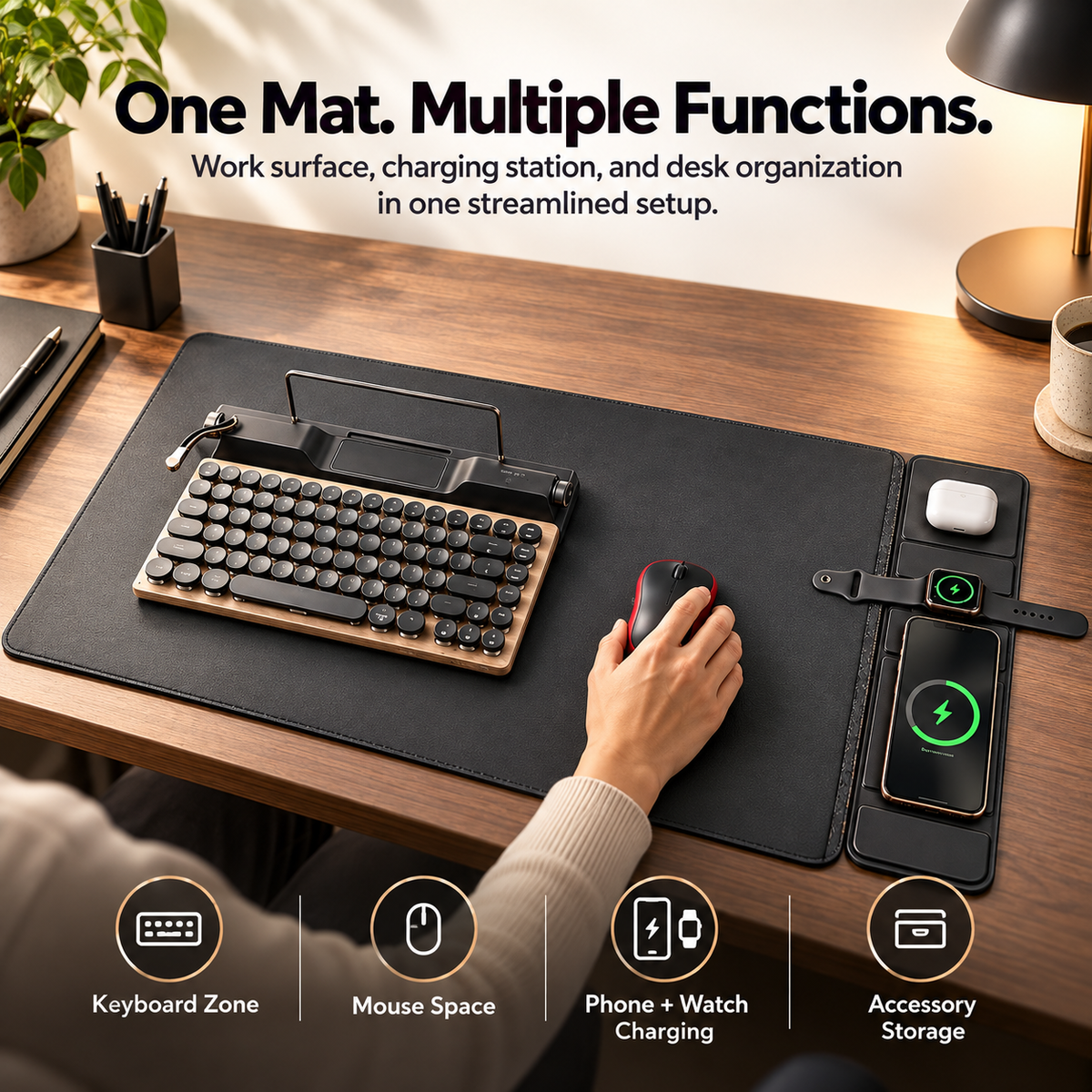
A multifunctional smart desk mat designed around modern laptop and desktop routines, combining a spacious work surface with dedicated wireless-charging areas, accessory organization and a fold-out stand in one streamlined setup.
Dedicated zones are shown for a compatible phone, wearable device and wireless-earbud case.
The main mat creates room for a keyboard, mouse and everyday desktop essentials.
Charging, work surface and organization are combined instead of spread across separate desk accessories.

Drop The Charging Cable Tangle And Build Power Into The Workspace.
Current seller imagery shows dedicated charging positions along one side of the mat for a compatible smartphone, wearable device and wireless earbud case. The idea is simple: keep frequently used devices together instead of spreading chargers across the desk.
A large lower charging zone is shown for a compatible wireless-charging smartphone.
Current promotional imagery shows a dedicated middle position for a compatible wearable device.
A separate upper zone keeps a compatible wireless-charging earbud case close to the rest of the setup.

Give The Keyboard And Mouse A Clean, Unified Surface.
The wide central section is designed to function as an everyday desk mat, providing one continuous area for a keyboard, mouse and other work essentials while the charging section stays organized along the edge.
Current seller imagery shows a compact keyboard positioned comfortably within the main work surface.
The same broad surface is presented as a smooth everyday mouse-working area.
The large-format layout is intended to visually unify commonly used desktop accessories.

Built-In Organization Helps The Desk Feel Intentionally Arranged.
Current gallery imagery highlights a textured work surface, built-in stand section and dedicated device areas. The live product description also lists a detachable organizer pouch for carrying cables, a power brick and an external mouse.
The current desk setup shows a recessed section that can help keep a pen or similarly sized item from wandering across the desktop.
A slim metal support rises from the mat area to create the seller-described stand function.
Dedicated device positions help separate charging gear from the main keyboard-and-mouse workspace.

Fewer Separate Desk Accessories. More Functions In One Footprint.
Current promotional imagery positions the product as one central surface for typing, mouse use, wireless charging and accessory organization. It is designed to reduce the number of separate pads, docks and loose charging areas competing for space.

Leave The Desk Cleaner When The Workday Ends.
Current seller imagery also presents the setup as an evening charging station: keyboard and mouse remain within the main surface while phone and other compatible devices rest on their charging positions.
Place compatible daily devices into their charging areas instead of scattering them across the room.
The charging area remains useful even after active keyboard-and-mouse work has finished.
One unified surface can make a workstation feel calmer than multiple disconnected pads and docks.

Designed To Move Beyond The Desk When The Workday Does.
The current written specification describes a wear-resistant PU leather exterior with a fleece lining and states that the product is sized for laptops up to approximately 16 inches. The same listing describes the item as providing laptop-sleeve protection while also converting into a desktop work surface.
The seller lists wear-resistant PU leather as the outer material.
Current written specifications list a soft fleece lining intended to help protect a compatible laptop from everyday scratches.
The seller states compatibility with laptops up to approximately 16 inches; always compare actual device dimensions before ordering.
Build A Cleaner Workspace In Three Straightforward Steps.
Lay the mat flat on the desk and position the work section where your keyboard and mouse naturally sit.
Use the supplied USB-C cable with a compatible power source that meets the product's requirements.
Align wireless-charging devices over their intended positions and rearrange the rest of the workspace around them.
Alignment, Device Support And Case Thickness All Matter.
Current specifications state a maximum wireless output of 15W.
The seller lists an approximate charging distance of 3–8 mm.
Current technical specifications list conversion efficiency at 70% or greater.
A Work Surface Designed To Do More Than Protect The Desk.
Integrated Wireless Charging
Seller-listed maximum output reaches 15W for compatible wireless-charging devices under suitable conditions.
Multi-Device Layout
Current imagery shows separate positions for a phone, wearable and earbud-style charging case.
Large Desk-Mat Surface
Provides one broad area for keyboard, mouse and everyday desk organization.
Fold-Out Support
Current product imagery shows an integrated fold-out support / stand section above the main work area.
Detachable Organizer Listed
The written listing states that a matching detachable pouch is provided for cables, power accessories and a mouse.
Up To 16-Inch Fit Claim
Seller specifications describe the protective sleeve configuration as fitting laptops up to approximately 16 inches.
What The Current Valorsca Page Clearly Supports.
| Current Live Product Name | All-in-One Smart Desk Mat with Wireless Charging |
|---|---|
| Primary Functions | Desk mat, mouse-working surface, wireless charging station, stand and workspace organization |
| Seller-Listed Wireless Output | 15W maximum |
| Seller-Listed Conversion Efficiency | ≥70% |
| Seller-Listed Charging Distance | Approximately 3–8 mm |
| Charging Layout Shown | Dedicated areas for compatible smartphone, wearable device and wireless-earbud case |
| Exterior Material | Wear-resistant PU leather according to the current specification |
| Interior / Protective Lining | Fleece lining according to the current written specification |
| Product Dimensions | 430 × 280 × 15 mm according to the current listing |
| Seller-Listed Laptop Fit | Up to approximately 16-inch laptops; verify actual device dimensions before purchase |
| Net Weight | Approximately 820 g according to the current technical specification |
| Color Options | Black and Brown currently listed |
| Package Contents | Wireless charging sleeve / desk mat, detachable pouch, USB-C cable and user manual according to the live specification |
Keep The Charging Zones Clear And The Electronics Dry.
Do not leave coins, keys or other loose metal items between a wireless-charging device and its charging surface.
A water-repellent material claim does not mean the integrated charging electronics should be soaked or submerged.
Some warmth can occur during wireless charging. Stop use if a device or charging area becomes unusually hot.
Before You Rebuild The Desk Around One Mat.
Is this a laptop sleeve or a desk mat?
Does it have wireless charging built in?
What is the maximum charging output?
Can it charge a phone, watch and earbuds?
Will every wireless-charging phone charge at 15W?
Can I charge through a phone case?
What is the large center section used for?
Does it work as a mouse pad?
Does it include a stand?
Does it come with an organizer pouch?
What material is used?
Is the material real leather?
Is the exterior waterproof?
What size is the product?
Will it fit a 16-inch laptop?
How much does it weigh?
What colors are currently offered?
Does a USB-C cable come with it?
What power adapter should I use?
Can I leave keys or coins on the charging area?
Make The Desk Work Harder Without Making It Look Busier.
Bring together your keyboard, mouse, charging devices and everyday work essentials on one multifunction surface designed to organize the desktop while adding integrated wireless power and portable laptop-friendly features.
Build A Cleaner All-In-One Workspace ↑Multifunctional desk and laptop accessory. Current Valorsca materials support a large desk-mat work surface, integrated wireless-charging areas, seller-listed 15W maximum output, ≥70% conversion efficiency, approximately 3–8 mm charging distance, fold-out stand functionality, PU leather exterior, fleece lining, seller-stated compatibility with laptops up to approximately 16 inches, dimensions of approximately 430 × 280 × 15 mm, net weight of approximately 820 g and a package listing that includes the charging sleeve / mat, detachable organizer pouch, USB-C cable and manual. The current URL and live product title describe the product differently, and the live gallery focuses primarily on desk-mat mode. Wireless charging requires compatible devices, and actual speed varies by device, power source, alignment and case. No third-party computer, phone, wearable or audio brand affiliation is claimed.